Sep 6, 2006 at 9:42 AM

Overview
There are 4 ways to link to or embed your pictures on another site. When viewing a photo, you will see 4 options to the left of the photo. Simply click in the field you want and it will automatically highlight the entire field. Copy and paste the contents of the field to another site.
Linking options are as follows:
Url
Direct URL to the posted image without a link.
Tag Recommended for sites/forums that support HTML code (i.e. Network 54, personal websites)
Embedded image with HTML link to the image's page on SuperMotors.
Img Recommended for sites/forums that support BBCode (i.e. vBulletin, phpBB, invision board)
Embedded image with link to the image's page on SuperMotors.
Thumb Recommended for sites/forums that support BBCode as well
Embedded thumbnail with link to larger image on SuperMotors.
-Eric
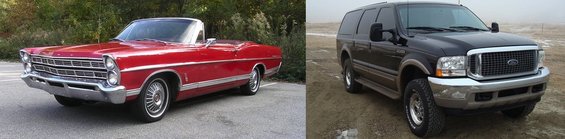
'67 Galaxie 500 - 390 FE, .030" over, FE to AOD adapter, disc brake conversion. The Daily Driver.
'00 Excursion - 7.3L PSD, LANDYOT Gen-II Radius Rods, Factory Tech Valve Body, 200K+ miles and going
'67 Galaxie 500 - 390 FE, .030" over, FE to AOD adapter, disc brake conversion. The Daily Driver.
'00 Excursion - 7.3L PSD, LANDYOT Gen-II Radius Rods, Factory Tech Valve Body, 200K+ miles and going
edited Nov 15, 2006 at 6:17 AM
