Mar 21, 2009 at 5:23 PM
On 3/21/2009 we introduced a new feature which allows you to select a default image for your registry entries. If you do not set a default image on your own, the server will automatically assign the default for you by choosing the first image posted to your registry entry.
Default images/avatars appear on the following pages:
- Your member profile http://www.supermotors.net/users/erlong
- Registry entry listings http://www.supermotors.net/registry/index.php?detail=1&rs=_________1_7_1_____1
- Your "my garage" listing http://www.supermotors.net/mygarage/
- Registry Home Page http://www.supermotors.net/registry/
Your registry entry will also show your avatar image by default on the main registry page. See my Galaxie's registry entry as an example: http://www.supermotors.net/10
To set your registry entry image/avatar:
1.) Visit http://www.supermotors.net/mygarage/ and select "Edit Album" on the registry entry you want to set the default image for
2.) Click on an album section
3.) Click the "Set as Default Registry Avatar" link on the right-hand side of the corresponding image you want to have as your default image.
Default images/avatars appear on the following pages:
- Your member profile http://www.supermotors.net/users/erlong
- Registry entry listings http://www.supermotors.net/registry/index.php?detail=1&rs=_________1_7_1_____1
- Your "my garage" listing http://www.supermotors.net/mygarage/
- Registry Home Page http://www.supermotors.net/registry/
Your registry entry will also show your avatar image by default on the main registry page. See my Galaxie's registry entry as an example: http://www.supermotors.net/10
To set your registry entry image/avatar:
1.) Visit http://www.supermotors.net/mygarage/ and select "Edit Album" on the registry entry you want to set the default image for
2.) Click on an album section
3.) Click the "Set as Default Registry Avatar" link on the right-hand side of the corresponding image you want to have as your default image.
-Eric
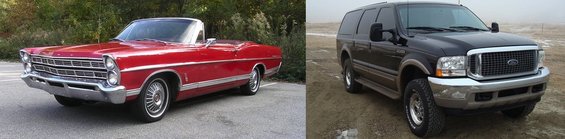
'67 Galaxie 500 - 390 FE, .030" over, FE to AOD adapter, disc brake conversion. The Daily Driver.
'00 Excursion - 7.3L PSD, LANDYOT Gen-II Radius Rods, Factory Tech Valve Body, 200K+ miles and going
'67 Galaxie 500 - 390 FE, .030" over, FE to AOD adapter, disc brake conversion. The Daily Driver.
'00 Excursion - 7.3L PSD, LANDYOT Gen-II Radius Rods, Factory Tech Valve Body, 200K+ miles and going