This document details the instrumentation and trip computer functions, including average fuel economy and metric conversion settings.
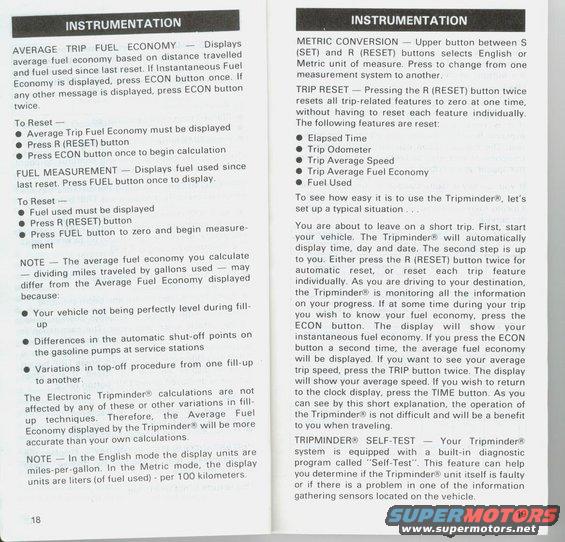
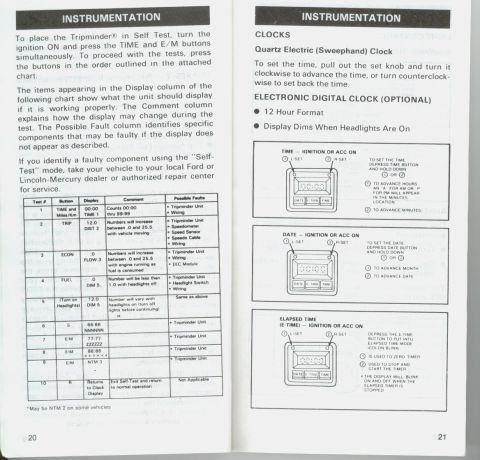
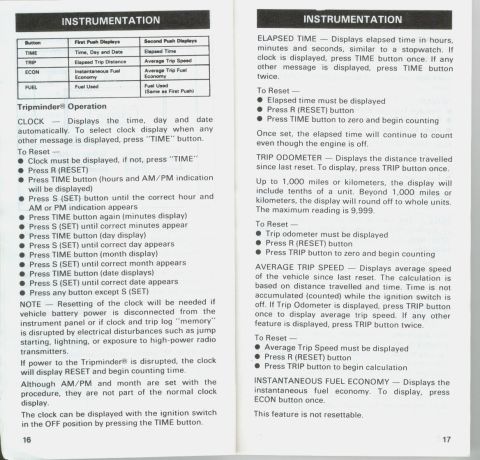
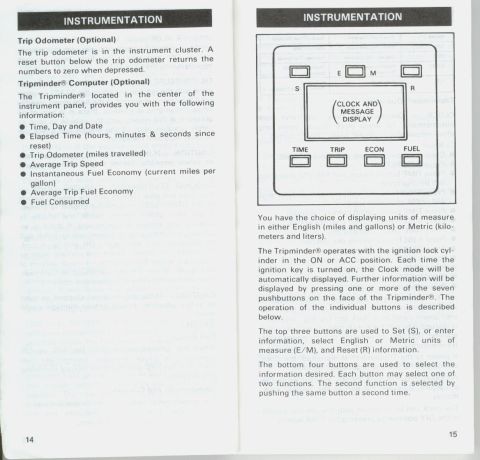
INSTRUMENTATION AVERAGE TRIP FUEL ECONOMY 7 Displlaly: average fuel economy based on distance traveF e l and fuel used since last reset, it instantaneous ueIf Economy is displayed, press ECON button ogcel any other message is displayed, press ECON ut on twtce, To Reset # . 0 Average Trip Fuel Economy must be displayed I Press R (RESET) button 0 Press ECON button once to begin calculation FUEL MEASUREMENT 7 Displays fuel used since last reset, Press FUEL button once to display. To Reset i 0 Fuel used must be displayed 0 Press R (RESET) button , 0 Press FUEL button to zero and begin measure ment NOTE r The average fuel economy you calculate # dividing miles traveled by gallons used-e mayj differ from the Average Fuel Economy displaye because 0 Your vehicle not being perfectly level during flii up 0 Differences in the automatic shuteoff points on the gasoline pumps at service stations 0 Variations in toproff procedure from one fillrup to another The Electronic Tripminderiii calculations are {t affected by any of these or other variations lnFl up techniques. Therefore, the Average uee Economy displayed by the Tripmindewi Will be mor accurate than your own calculations NOTE I In the English mode the display units are milesrper-gallon. in the Metric mode, the diSplay units are liters (of fuel used) - per 100 kilometers 13 INSTRUMENTATION METRIC CONVERSION A. Upper button between S (SET) and R (RESET) buttons selects English or Metric unit of measure. Press to change from one measurement system to another TRIP RESET 7 Pressing the R (RESET) button twice resets all trip-related features to zero at one time, Without having to reset each feature indiwdually The following features are reset. 0 Elapsed Time 0 Trip Odometer 0 Trip Average Speed 0 Trip Average Fuel Economy 0 Fuel Used To see how easy it is to use the Trlpmlnderxi, lets set up a typical situation You are about to leave on a short trip. First. start your vehicle. The Tripminder Will automatically display time, day and date. The second step is up to you. Either press the R (RESET) button twice for automatic reset, or reset each tnp feature individually As you are driving to your destination, the Tripmlnder IS monitoring all the information on your progress. If at some time during your trip you Wish to know your fuel economy, press the ECON button. The display will show your instantaneous fuel economy. If you press the ECON button a second time, the average fuel economy will be displayed If you want to see your average trip speed, press the TRIP button twice. The display Will show your average speed If you Wish to return to the clock display, press the TIME button As you can see by this short explanation, the operation of the Tripminder is not difficult and Will be a benefit to you when traveling. TRIPMINDER SELF-TEST 7 Your Tripminderfnt system is equipped With a built~in diagnostic program called "SelfrTest" This feature can help you determine if the Tripmindere unit itself is faulty or if there is a problem in one of the information gathering sensors located on the vehicle 19
Comments
More from this build
No comments yet.