TunerPro RT EE.xdf Speed Density Mode Flag & Diagnostic Flags Screenshot

Reference · 2000-2003 S2000All 1 manual pages
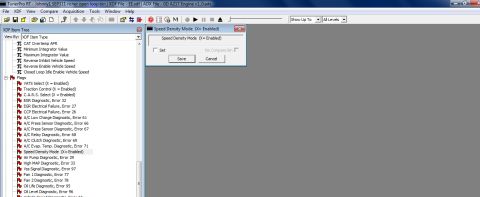
TunerPro RT calibration editor screenshot listing PCM XDF parameters and flags: VATS, traction control, Speed Density mode, plus EGR/AIR/MAP/fan diagnostic error codes 25-97.
Part of 2000-2003 Honda S2000 Manual Pages
This is a screenshot of the TunerPro RT ECU tuning software with a binary file named "Johnny1 SEP311 richer open loop.bin" open, using the XDF definition file "EE.xdf" and the ADX acquisition file "0D A217 Engine v1_0.adx". The left pane shows the XDF Item Tree viewed by XDF Item Type, listing scalar parameters (CAT Overtemp AFR, Minimum/Maximum Integrator Value, Reverse Inhibit/Enable Vehicle Speed, Closed Loop Idle Enable Vehicle Speed) and a Flags section containing enable/diagnostic flags such as VATS Select, Traction Control, C.A.R.S. Select, EGR Diagnostic (Error 32), EGR Electrical Failure (Error 27), CCP Electrical Failure (Error 26), multiple A/C diagnostics (Errors 61, 66, 67, 68, 69, 71), Air Pump Diagnostic (Error 29), High MAP Diagnostic (Error 33), Vss Signal Diagnostic (Error 97), Fan 1/2 Diagnostics (Errors 77, 78), and Oil Life/Level Diagnostics (Errors 95, 96). The "Speed Density Mode (X= Enabled)" flag is selected, and an open dialog shows its unchecked "Set" checkbox with Save and Cancel buttons, demonstrating how to enable speed density mode in the tune. A reader learns which flags and error-code diagnostics exist in this EE.xdf definition and how the Speed Density Mode flag is toggled.
Is this accurate? Sign in to help verify it.
Frequently asked questions
- How do you enable Speed Density Mode in TunerPro RT with the EE.xdf definition?
- Select the "Speed Density Mode (X= Enabled)" flag under Flags in the XDF Item Tree, which opens a dialog with a "Set" checkbox; check it and click Save to enable the flag.
- What error code corresponds to the EGR Diagnostic flag in this XDF?
- The EGR Diagnostic flag corresponds to Error 32; a separate EGR Electrical Failure flag corresponds to Error 27.
- Which A/C-related diagnostic flags and error codes are listed?
- A/C Low Charge Diagnostic (Error 61), A/C Press Sensor Diagnostic (Errors 66 and 67), A/C Relay Diagnostic (Error 68), A/C Clutch Diagnostic (Error 69), and A/C Evap. Temp. Diagnostic (Error 71).
- What files are loaded in this TunerPro RT session?
- The binary "Johnny1 SEP311 richer open loop.bin", the XDF definition file "EE.xdf", and the ADX file "0D A217 Engine v1_0.adx".
- What error codes are assigned to the fan and oil diagnostics?
- Fan 1 Diagnostic is Error 77, Fan 2 Diagnostic is Error 78, Oil Life Diagnostic is Error 95, and Oil Level Diagnostic is Error 96.
No comments yet.